> ## Documentation Index
> Fetch the complete documentation index at: https://help.campfire.ai/llms.txt
> Use this file to discover all available pages before exploring further.
# Reimbursements
> How Ramp employee reimbursements post in Campfire on an accrual or cash basis, how payouts are matched, and how to set the vendor and liability account.
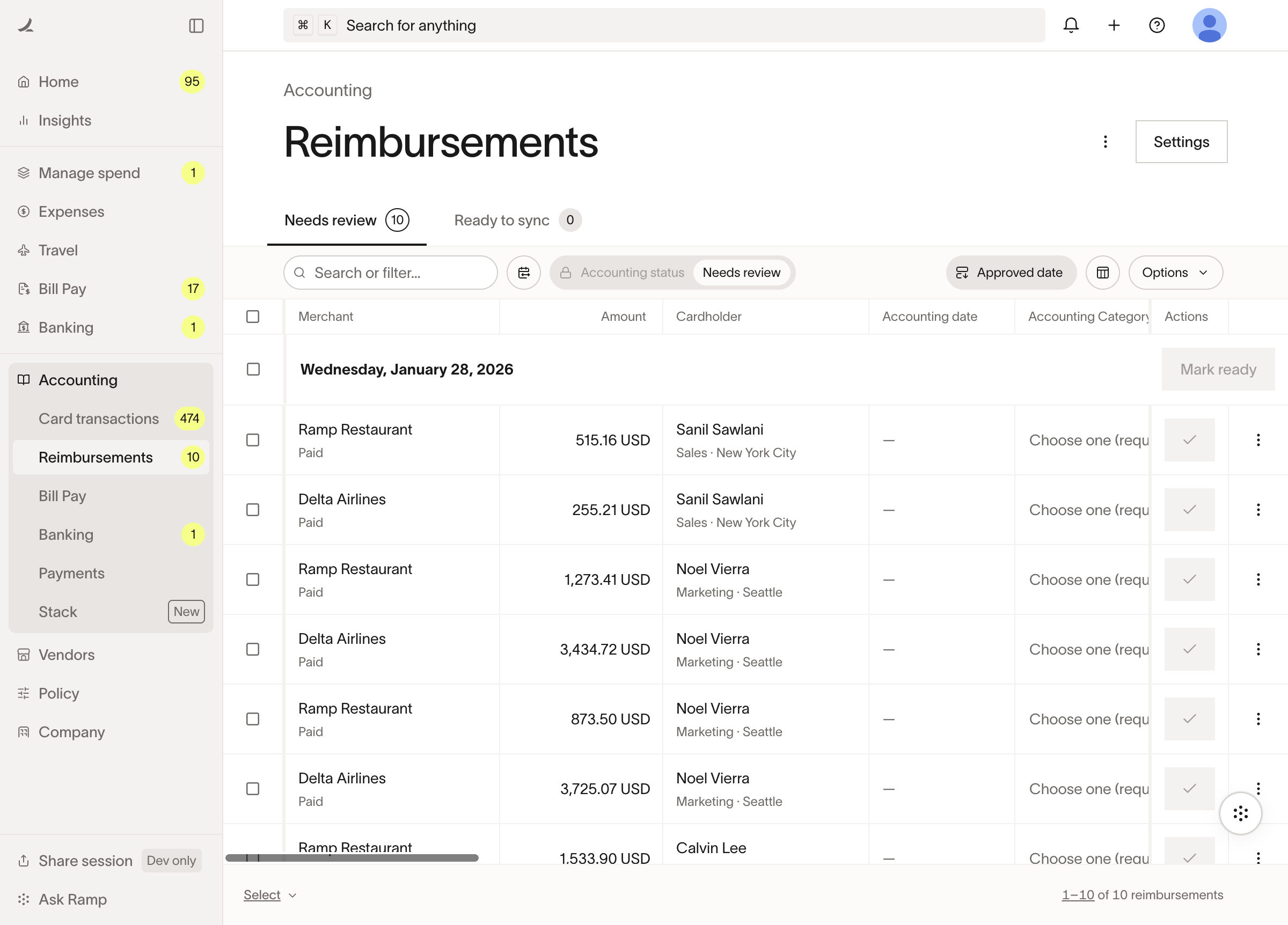
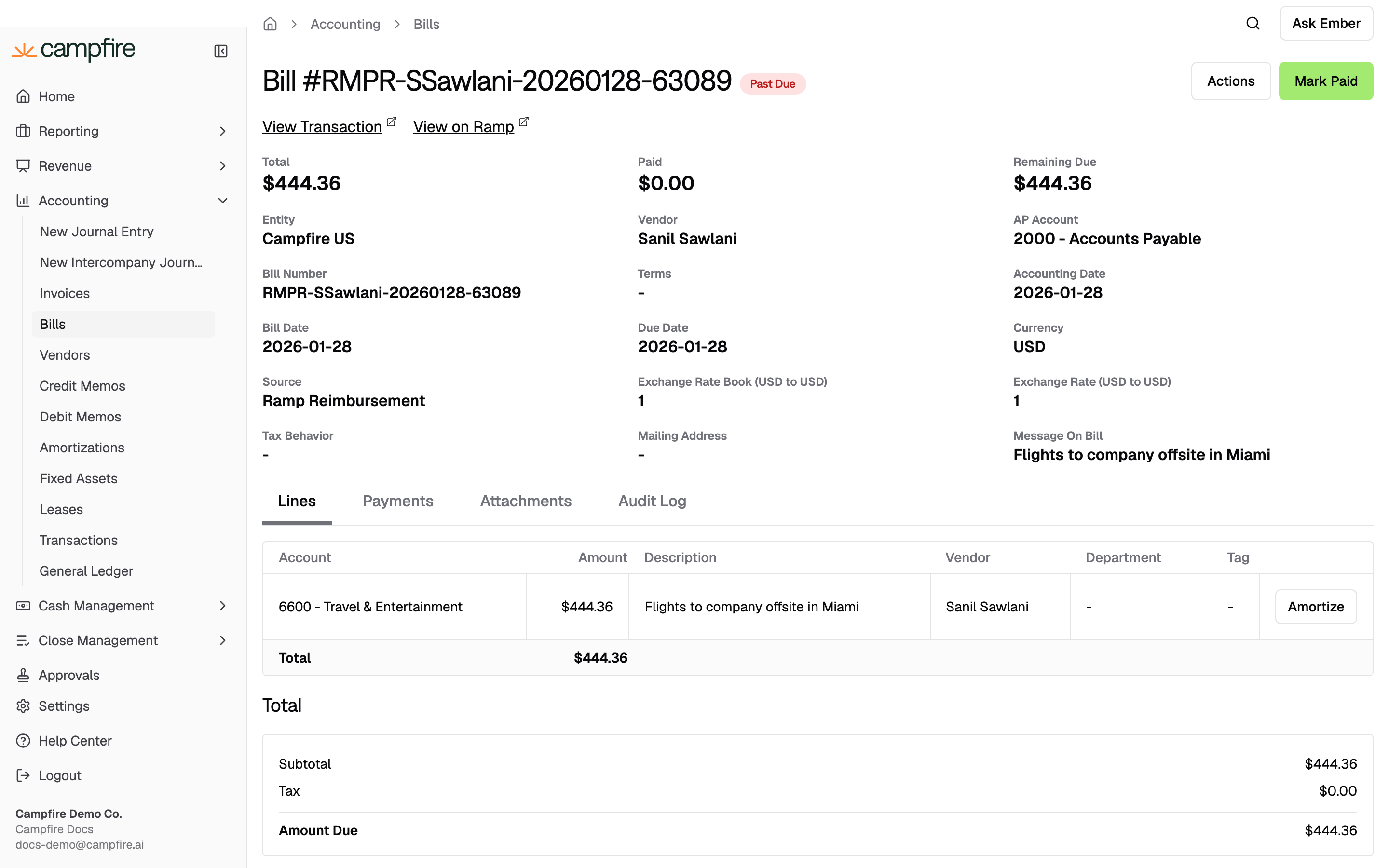
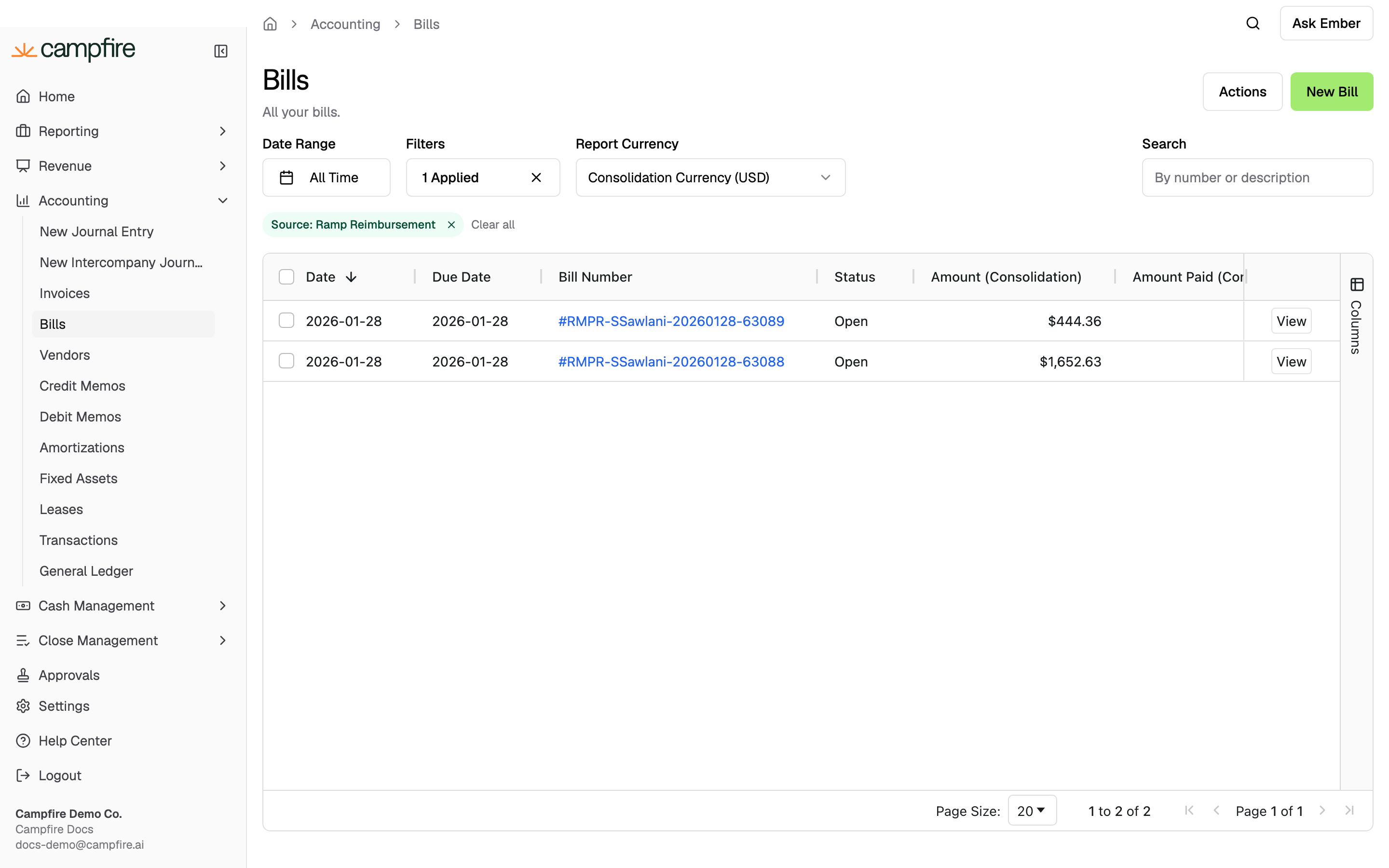
Ramp employee reimbursements sync to Campfire as bills. How they post depends on whether you create the bill when the reimbursement is approved or wait until it is paid.
```mermaid theme={null}
sequenceDiagram
autonumber
participant R as Ramp
participant C as Campfire
participant B as Bank feed
alt Accrual (Create Bills on Approval on)
R->>C: Reimbursement approved, Ready to Sync
Note over C: Debit expense · Credit reimbursement liability
B->>C: Payout matches the bill
Note over C: Debit reimbursement liability · Credit bank
else Cash (setting off)
B->>C: Payout syncs as uncategorized
R->>C: Reimbursement coded to Ready to Sync
Note over C: Debit expense · Credit bank
end
```
 ## Accrual basis (recommended)
With **Create Bills from Reimbursements on Approval** on, Campfire creates the reimbursement bill as soon as it is marked **Ready to Sync** in Ramp:
| Side | Account |
| ------ | ------------------------------------------------------------- |
| Debit | Expense accounts, from the Ramp coding |
| Credit | Reimbursement liability, the account mapped on the connection |
When the payout later clears your bank, Campfire matches the bank transaction to the bill and marks it paid.
## Accrual basis (recommended)
With **Create Bills from Reimbursements on Approval** on, Campfire creates the reimbursement bill as soon as it is marked **Ready to Sync** in Ramp:
| Side | Account |
| ------ | ------------------------------------------------------------- |
| Debit | Expense accounts, from the Ramp coding |
| Credit | Reimbursement liability, the account mapped on the connection |
When the payout later clears your bank, Campfire matches the bank transaction to the bill and marks it paid.
 Map a dedicated **Reimbursement Liability Account** on the connection,
separate from your main accounts payable and bill-payment accounts. Keeping
reimbursements in their own account makes them far easier to reconcile against
your bank feed.
## Cash basis
With the setting off, Campfire waits for cash movement. The payout syncs first as an uncategorized transaction; once the reimbursement is categorized and marked Ready to Sync in Ramp, Campfire updates the debit side to the correct expense account and leaves the bank credit in place. The expense is recorded only when the payout occurs.
## Vendor on the bill
By default the reimbursement bill uses a shared Ramp vendor. Turn on **Use Employee as Vendor for Reimbursement Bills** to use the employee's name instead.
## Matching the payout
For Campfire to match a reimbursement payout automatically, the bank transaction must be uncategorized and its description must contain **both** the Ramp payment ID and a Ramp reference (**RMPR** on older payouts, **RAMP PAYMENTS** on newer ones), with an amount equal to the reimbursement. When several reimbursements are paid in one payout, Campfire matches the payout to those bills when the amount equals the batch total.
Non-USD payouts arrive as wires without those references, so Campfire matches them by currency plus a RAMP token instead, on the exact batch amount only. If your bank feed strips the reference, or the amount doesn't line up, the payout won't auto-match and you'll apply it by hand.
Map a dedicated **Reimbursement Liability Account** on the connection,
separate from your main accounts payable and bill-payment accounts. Keeping
reimbursements in their own account makes them far easier to reconcile against
your bank feed.
## Cash basis
With the setting off, Campfire waits for cash movement. The payout syncs first as an uncategorized transaction; once the reimbursement is categorized and marked Ready to Sync in Ramp, Campfire updates the debit side to the correct expense account and leaves the bank credit in place. The expense is recorded only when the payout occurs.
## Vendor on the bill
By default the reimbursement bill uses a shared Ramp vendor. Turn on **Use Employee as Vendor for Reimbursement Bills** to use the employee's name instead.
## Matching the payout
For Campfire to match a reimbursement payout automatically, the bank transaction must be uncategorized and its description must contain **both** the Ramp payment ID and a Ramp reference (**RMPR** on older payouts, **RAMP PAYMENTS** on newer ones), with an amount equal to the reimbursement. When several reimbursements are paid in one payout, Campfire matches the payout to those bills when the amount equals the batch total.
Non-USD payouts arrive as wires without those references, so Campfire matches them by currency plus a RAMP token instead, on the exact batch amount only. If your bank feed strips the reference, or the amount doesn't line up, the payout won't auto-match and you'll apply it by hand.
 ## Troubleshooting
Automatic sync pulls reimbursements marked **Ready to Sync** in Ramp and
submitted in the last 60 days (6 months on the connection's first sync).
Older reimbursements need Ramp's **Sync** button. Payment matching runs on a
separate cycle that looks back up to a year, so a paid reimbursement can
match even when its submission falls outside the sync window.
On the accrual basis, the bill stays open until the payout syncs and
matches. Confirm the payout has come through your bank feed with the Ramp
payment ID and reference (RMPR or RAMP PAYMENTS) in the description and an
amount equal to the reimbursement or batch. Reimbursements paid in another
currency match on currency and exact batch amount only, and can need manual
application.
Ramp reported the reimbursement as paid but Campfire found no matching bank
transaction in the expected window. Check that the payout has synced from
your bank feed and carries the Ramp payment reference, or apply the payment
manually.
Timing follows the **Create Bills from Reimbursements on Approval** setting:
on, the expense posts at approval; off, it posts when the payout clears.
Adjust the setting under [**Settings > Connections >
Ramp**](https://app.meetcampfire.com/v2/settings/ramp).
## Related
The full sync picture across all record types.
Reimbursement and vendor options in full.
## Troubleshooting
Automatic sync pulls reimbursements marked **Ready to Sync** in Ramp and
submitted in the last 60 days (6 months on the connection's first sync).
Older reimbursements need Ramp's **Sync** button. Payment matching runs on a
separate cycle that looks back up to a year, so a paid reimbursement can
match even when its submission falls outside the sync window.
On the accrual basis, the bill stays open until the payout syncs and
matches. Confirm the payout has come through your bank feed with the Ramp
payment ID and reference (RMPR or RAMP PAYMENTS) in the description and an
amount equal to the reimbursement or batch. Reimbursements paid in another
currency match on currency and exact batch amount only, and can need manual
application.
Ramp reported the reimbursement as paid but Campfire found no matching bank
transaction in the expected window. Check that the payout has synced from
your bank feed and carries the Ramp payment reference, or apply the payment
manually.
Timing follows the **Create Bills from Reimbursements on Approval** setting:
on, the expense posts at approval; off, it posts when the payout clears.
Adjust the setting under [**Settings > Connections >
Ramp**](https://app.meetcampfire.com/v2/settings/ramp).
## Related
The full sync picture across all record types.
Reimbursement and vendor options in full.